Made for the occasion
A real Community Gathering starting point.
Begin with a real Community Gathering design, then add the names, date, venue and details that make the event yours.
GlobalWork & Community collection
Begin with a real Community Gathering design, then add the names, date, venue and details that make the event yours.
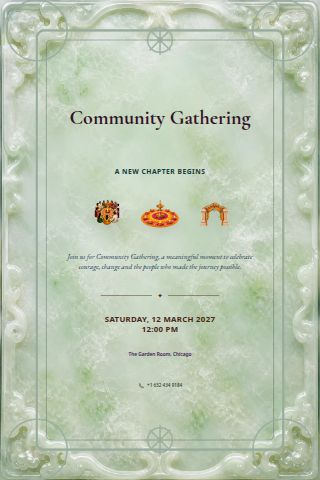
Anatomy of the card
Get these right and guests have what they need. Hotel blocks, transport and a second page can stay as optional detail.
Write names exactly as guests know them, in the order that feels right for the event.
Name the Community Gathering clearly so guests understand the invitation at a glance.
Give one clear date and the time guests should arrive.
Include enough detail for a map app, including the room or entrance when it matters.
Add the ceremony, meal, performance or other schedule details guests need to plan.
Choose one reply date and keep the response instructions simple.
Explain attire, gifts or meaningful traditions in direct, welcoming language.
Add parking, transport, accommodation or accessibility details only when useful.
Invitation planning
Explore Community Gathering invitation wording and design ideas, including the details guests need and ways to personalize this editable event template.
Wording for Community Gathering invitations gives recipients an immediate sense of what is being observed or celebrated. This page focuses on a purposeful gathering for colleagues, partners, participants or the wider community, with room to adapt the opening to the hosts’ own voice, schedule and community.
For Community Gathering, make the event name, organiser, schedule, location and registration action immediately clear. Add audience, agenda, speaker, access, cost, dress or networking information in priority order so recipients can decide quickly and arrive prepared.
The dedicated Community Gathering artwork provides a relevant visual anchor instead of relying on an unrelated generic party graphic. Use restrained typography, a clear information hierarchy and organisation colours where appropriate so the invitation feels credible and actionable. Every text block, colour, frame and artwork choice remains editable before the card is shared online or downloaded.
Wording and RSVP
Replace the brackets with real details and adjust the tone to suit your family, community and event.
“Please join us for Community Gathering with [name or names].”
“We will gather on [date] at [time] at [venue].”
“Please reply by [date] using the RSVP link on this invitation.”
Ask only for attendance, party size, and any food or access information you genuinely need. State one reply deadline and check the published invitation before sharing its private guest link.
Made for the occasion
Begin with a real Community Gathering design, then add the names, date, venue and details that make the event yours.
From design to guest list
Open thoughtful Community Gathering copy, then edit every line on the card.
Artwork, frame, colours, type and layout all move in the designer.
Publish a private guest link, collect replies, or download PNG and PDF.
 USA
USA
 Global
 Global
 USA
USA
 Global
 Global